What Owners and Agents Need to Know
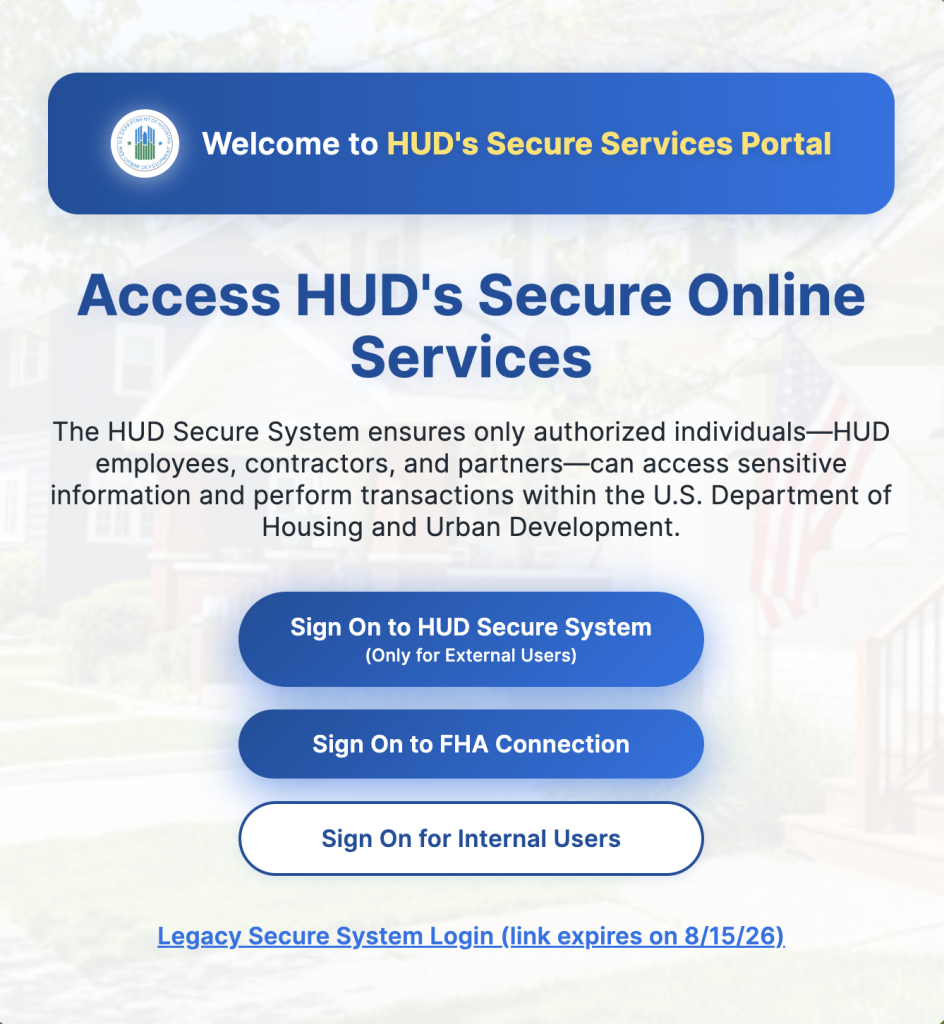
Updated October 5, 2026: HUD has extended access to the legacy Secure Systems landing page through October 14, 2026 After that date, the legacy URL will no longer be available. Users will be redirected to HUD’s new Secure Online Services interface. Owners and agents should begin using the new page now and update saved bookmarks before the transition.
HUD Secure Systems now has a new landing page for Multifamily Housing partners and system users. HUD’s Office of the Chief Information Officer launched the page in July 2026. The change begins HUD’s broader identity and access modernization effort.
Owners, agents, coordinators, and system users do not need to create new accounts. They also do not need to update their existing access. However, property teams should know what changed. They should also confirm that staff can recognize and reach the correct login page
HUD Secure Systems Introduces a New Sign-In Page
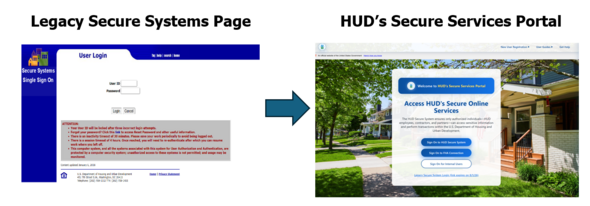
Users who access HUD systems through the Web Access Security Subsystem will now see a new landing page. HUD commonly refers to the Web Access Security Subsystem as WASS.
The updated page creates a more direct path to HUD’s secure online services. It also provides separate options for external users, FHA Connection users, and internal HUD users.
The change affects users of several Multifamily Housing systems, including:
- Integrated Real Estate Management System, or iREMS
- Tenant Rental Assistance Certification System, or TRACS
- Active Partners Performance System, or APPS
- Capital Needs Assessment Tool, or CNA e-Tool
- Multifamily Delinquency and Default Reporting, or MDDR
- Mark-to-Market, or M2M
Key Takeaways
- HUD has extended access to the legacy Secure Systems landing page through October 14, 2026.
- After October 14, users will be redirected to HUD’s new Secure Online Services page.
- Owners and agents should update bookmarks and internal login instructions now.
HUD designed the new page to simplify navigation and improve system access. The page also supports improved accessibility, updated guidance, FAQs, and help resources.
This update changes the front door to these systems. It does not replace the systems themselves.
Users should continue signing in with their current credentials and assigned permissions.
What the HUD Secure Systems Change Means for Property Teams
The new landing page should not change daily responsibilities inside TRACS, iREMS, APPS, or other affected systems. It also should not change established WASS roles or access permissions.
Still, even a simple login change can create confusion. Staff may question whether the page is legitimate. They may also use saved bookmarks that point elsewhere. Therefore, owners and agents should prepare staff for the new appearance.
Share HUD’s announcement with employees who use affected systems. Include coordinators, system administrators, compliance staff, voucher staff, and other authorized users. In addition, review internal instructions that include screenshots or login directions. Update those materials when they show the former landing page.
Teams should also verify that shared bookmarks point to the current HUD page. However, staff should never share individual usernames or passwords.
HUD states that users do not need to register again. Users also do not need to update accounts before or after the launch. That distinction matters. Staff should not create duplicate accounts because the page looks different.
Owners and agents should also remind users to confirm that they are on an official HUD website. This practice supports responsible system access and reduces avoidable login problems.
Steps Owners and Agents Should Take
HUD does not require formal action for this change. Still, several practical steps can support a smoother transition. Update saved bookmarks before October 14. Staff should begin accessing Secure Systems through HUD’s new Secure Online Services page rather than relying on the legacy landing page.
First, notify staff who regularly use HUD Secure Systems. Explain that the login page has changed, but their account access should remain the same.
Next, review bookmarks, training guides, desk procedures, and onboarding materials. Replace outdated login instructions where needed.
Then ask authorized users to confirm they can access their assigned systems. Staff should report access issues through the established internal process.
Owners and agents should also confirm who manages WASS access for their organization. Each organization should maintain clear responsibilities for assigning and removing system permissions.
A changed landing page does not correct expired credentials or missing permissions. It also does not automatically add systems to a user’s account.
For example, a user who cannot see TRACS may still need assistance from the organization’s coordinator or system administrator. Navigate’s TRACS resource page explains that users need the correct assigned permission.
Finally, remind employees not to respond to unexpected requests for passwords or sensitive information. Staff should use official HUD channels for login support.
Transition Period and Support
HUD has extended the transition period for the legacy Secure Systems landing page through October 14, 2026. HUD announced the extension following feedback from end-user training. The additional time is also intended to reduce disruption to critical system functions during the transition.
After October 14, the legacy URL will no longer be available. Users who visit the former page will instead be redirected to HUD’s new Secure Online Services page. Therefore, owners and agents should begin using the new landing page now. Teams should also update bookmarks, internal instructions, and training materials before the deadline.
Because legacy access is temporary, organizations should begin using the new landing page now. They should also update bookmarks before the legacy option expires.
Users experiencing Multifamily system problems can contact HUD’s Multifamily Help Desk.
HUD lists the following support options:
- Email: RealEstateMGMT@hud.gov
- Phone: 1-888-297-8689, option 5
Before contacting the Help Desk, users should clearly document the issue. They should note the affected system, error message, date, time, and steps already attempted. However, users should not email passwords, Social Security numbers, resident data, or other sensitive information.
Owners and agents can also review Navigate’s Tuesday Tips and PBRA training resources for practical operational guidance.
Frequently Asked Questions
What is the new HUD Secure Systems landing page?
The new landing page provides a central sign-in location for HUD’s secure online services. HUD launched it as part of its access modernization effort.
Do users need to create a new HUD Secure Systems account?
No. HUD states that users do not need to register again or update their existing accounts.
Will current WASS credentials still work?
HUD indicates that users can continue accessing their systems through the new landing page. Existing permissions still control available system access.
Which Multifamily Housing systems are affected?
The change affects iREMS, TRACS, APPS, CNA e-Tool, MDDR, and M2M users.
Does the new page change TRACS submission requirements?
The HUD email does not announce changes to TRACS submissions, deadlines, or processing requirements. It only addresses the system landing page.
What should users do if TRACS does not appear?
Users should contact their organization’s coordinator or system administrator. The user may need an assigned TRACS permission.
Should owners and agents update their internal procedures?
Yes. Teams should update bookmarks, screenshots, onboarding materials, and written login instructions that show the former page.
Where can users get help with Multifamily systems?
Users can contact HUD’s Multifamily Help Desk at RealEstateMGMT@hud.gov or 1-888-297-8689, option 5.